
As more agents begin operating browsers directly, people are asking how browser-use approaches, from Codex's Chrome integration to Tabbit CLI, affect task efficiency and the user experience. How do they work under the hood?
Starting with the evolution of browser automation, this article explains Tabbit CLI's design and engineering. In our evaluation, it compared favorably with Codex Chrome on time and accuracy while reducing input token usage by 47.2% and tool calls by 16.8%.
By sharing these experiences, we hope to explore with the community how to improve agent capabilities and the Tabbit CLI experience.
Contents: jump to the sections that interest you
1. From browser automation to agents
1.1 WebDriver and CDP
1.2 Automation tools, extension APIs, and built-in browser capabilities
1.3 The gap between existing tools and everyday use
2. Designing Tabbit CLI
2.1 From the agent to task pages
2.2 Browser-owned runtime and task boundaries
2.3 How an agent works
3. A worked example: reshipping orders lost in transit
4. Practical lessons from Tabbit CLI and Skills
5. Evaluation results and scope
5.1 Evaluation setup and results
5.2 Turning model capabilities into task efficiency
References
Author: Bo Yousi, Tabbit engineer
1. From browser automation to agents
1.1 WebDriver and CDP
Programmatic browser control has long been useful for web testing, data collection, and repetitive operations.
Before agents, developers already used automation scripts to open pages, find elements, fill forms, and verify results. Browser automation originally served web testing.
WebDriver originated in Selenium and later became a W3C standard. A test program sends HTTP commands such as opening a URL, finding an element, or clicking, which each browser's driver executes. Chrome's driver, ChromeDriver, internally translates WebDriver commands into Chrome DevTools Protocol (CDP) calls.
CDP is Chromium's debugging protocol for developer tools. DevTools uses it to retrieve page structure, network requests, and console output.
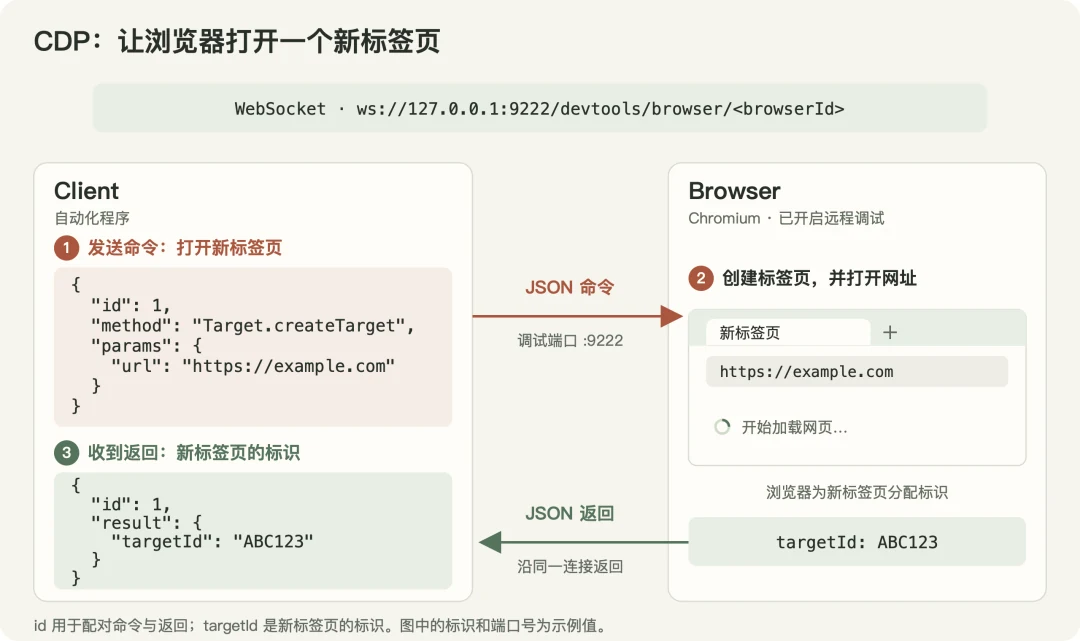
Figure 1. A CDP client sends Target.createTarget to open a new tab. The browser creates it, begins loading, and returns its targetId. Identifiers and port numbers are illustrative.
1.2 Automation tools, extension APIs, and built-in browser capabilities
Traditional WebDriver primarily uses requests and responses without actively pushing page events. CDP exposes lower-level commands, so complex actions require several commands to be combined.
For mouse input, for example, the caller calculates coordinates and separately sends press and release events. It must also determine when a button becomes clickable or a page finishes refreshing. Cross-process iframes require separate session management.
Puppeteer, released by the Chrome team in 2017, and Playwright, released by Microsoft in 2020, wrap these capabilities in page, element, and action APIs, handling location and waiting inside the library. The Playwright example below finds the Confirm reshipment button in a dialog by role and name, waits until it is actionable, clicks it, and waits for a success message:

A Locator stores a rule for finding an element rather than a particular node or coordinate. It resolves the target again for each action, remaining useful after the page layout changes (Figure 2).
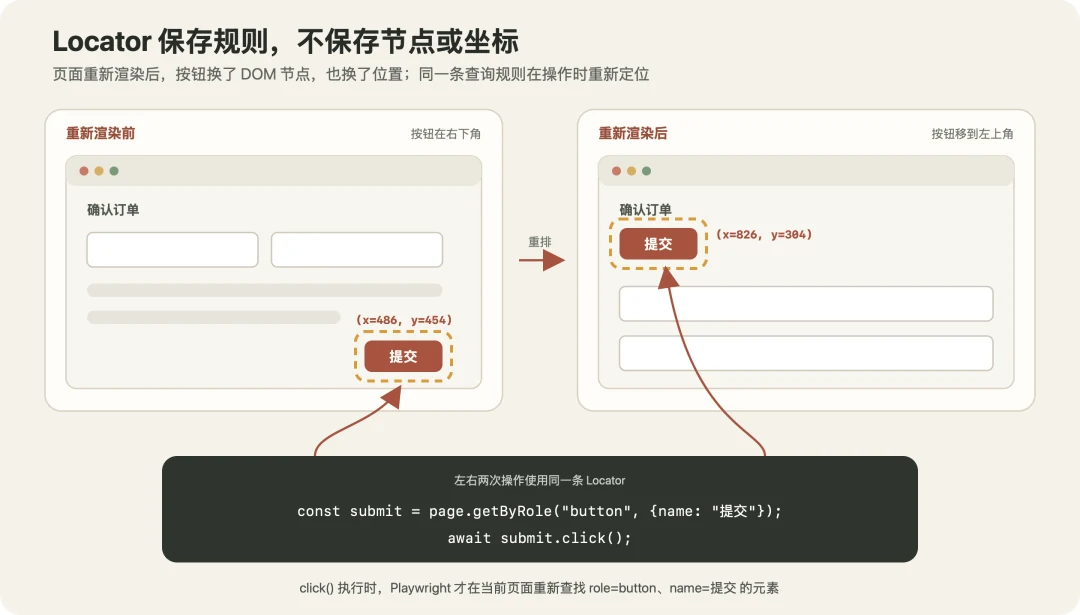
Figure 2. After a layout change, the Locator finds the target again when performing the action.
Chrome also supports extension-based access and built-in browser control. Chromium's Actor framework exemplifies the latter: the browser organizes and executes webpage actions itself. The chrome.debugger API lets extensions call CDP. Once an extension has debugging permission and attaches to a tab, it can send commands and receive events without requiring the user to open a remote debugging port.
1.3 The gap between existing tools and everyday use
These tools can open pages, click, and type, but they usually target testing and collection environments in which a program manages the browser.
For example, a Playwright script can launch a fresh browser without the user's existing login state, switch tabs, resize pages, and close the browser it started when finished.
This works well for independent tests, but less well for an agent sharing a browser with its user.
Tabbit CLI was designed to let people keep their preferred agents and models while completing web tasks directly in their everyday Tabbit browser, with as little disruption to normal browsing as possible.
2. Designing Tabbit CLI
2.1 From the agent to task pages
In an agent, the model uses tool calls to operate on its environment. The host program executes them and returns the results.
A tool can be a shell for running bash commands or a dedicated tool, such as js, registered by an extension or MCP service. A Skill supplies usage instructions that the model reads as needed.
Enabling browser use therefore depends on the tools offered and how they connect to the browser.
CDP can control the browser directly, but connecting through a remote debugging port requires launching the browser with the appropriate configuration, opening the port, and giving the caller the connection address.
For an everyday browser this adds setup and encounters default-profile restrictions: since Chrome 136, remote debugging ports cannot be enabled on the default profile.
Products such as Browser Use therefore wrap the connection process or connect through extensions, so users and agents do not have to manage it directly. Typical approaches include:
Browser extension access: Codex's ChatGPT browser extension.
The agent calls a js tool, which executes in the Codex session's Node REPL. Native Messaging, the communication mechanism between a browser extension and a local program, passes operations to the extension. It controls tabs through chrome.debugger without requiring an open remote debugging port.
A local daemon connecting to a debugging port: Browser Use CLI.
The agent invokes the command line. A persistent local process manages the connection, operating local Chrome through CDP or connecting to a cloud browser. This wraps connection details, but local Chrome still requires a debugging port.
Command line plus extension: BrowserSkill.
The agent calls bsk. Requests pass through a local daemon and WebSocket to a Chrome or Edge extension, which operates the page. The command line supplies a common entry point and the extension connects to the browser.
Tabbit uses a CLI and Skill as its entry point, but keeps the persistent execution environment on the browser side. The browser controls task pages over a private channel. Different agents can share the same entry point, and task state does not have to depend on one agent session.
Agents always invoke the same tabbit-cli launcher, which selects the browser instance. Tabbit detects installed agents and installs the Skill into their Skill directories, covering 25 product types, including Claude Code, Codex, Cursor, and Gemini CLI, without modifying their configurations. We chose a CLI for two main reasons:
Compatibility with the capabilities most agents already have.
Most agents can already execute commands through a shell such as bash, without separate MCP configuration or plugin installation. The wealth of shell code in training data also makes this calling style familiar to models and can reduce command-writing mistakes.
Encapsulating browser communication simplifies integration and permission management.
Some agent tool interfaces or sandboxes cannot directly access Unix sockets. Exposing a browser-control socket without identity checks and task boundaries can also permit unauthorized actions. Tabbit centralizes requests through the CLI; the browser validates task and page ownership. Agents do not directly connect to the control interface and need neither an extension nor a public debugging port.
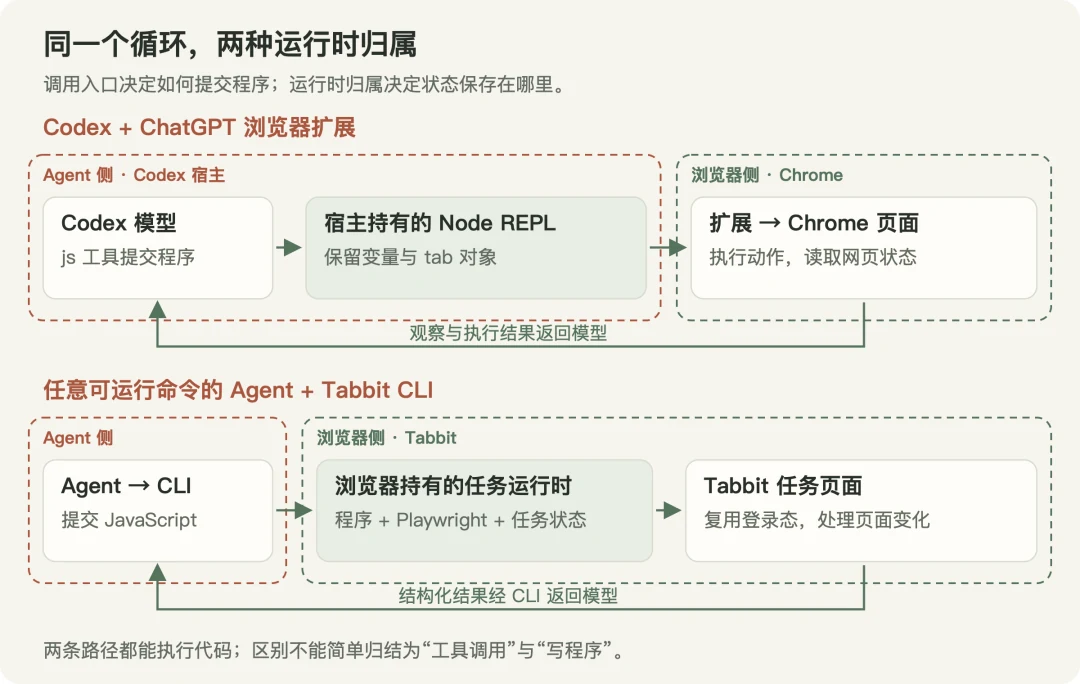
Figure 3. The same working loop with different connection paths and runtime ownership. Internal communication details are omitted; arrows represent both requests and returned results.
The agent submits JavaScript to the user's Tabbit browser using a command-line heredoc (here-document). Programs use standard Playwright code by default. Each task corresponds to a set of browser pages and a persistent execution environment. Pages and state can survive between calls while the task remains valid, and each call returns a structured result. Here is a complete example:
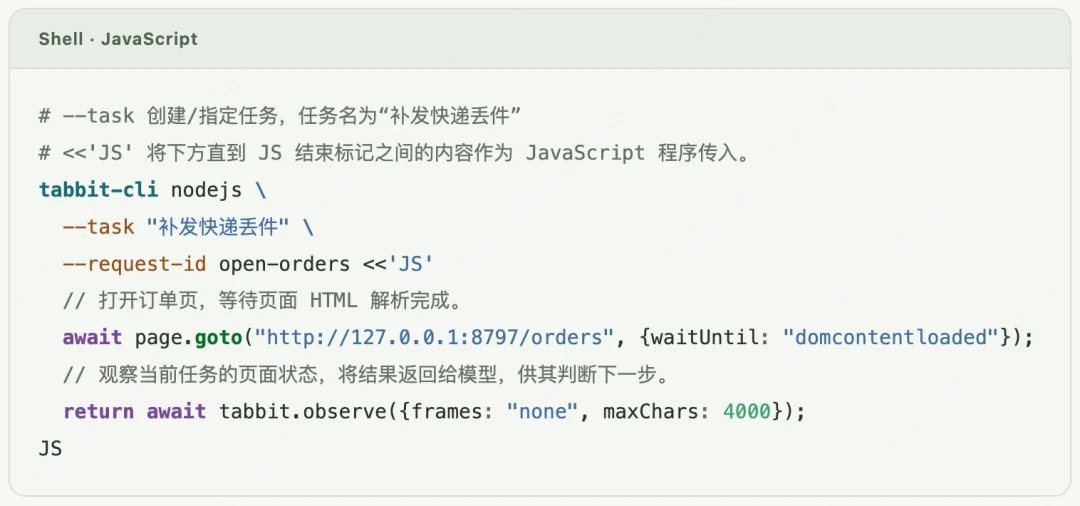
Separate program submission from result retrieval. A browser task can outlast an agent's tool call: the command may time out while page operations continue. Retrying immediately could submit an order twice. Tabbit therefore keeps execution state and results in the browser, allowing the agent to query them after an interruption. Request identifiers prevent the same submission from executing twice within a task. Execution does not depend on keeping the command-line connection open, and recovery has a record to check.
2.2 Browser-owned runtime and task boundaries
The browser manages the execution service, with separate state for each task.
Tabbit starts and maintains the CLI execution service, assigning an independent Worker to each task. Program variables, page objects, and results stay separate so tasks do not mix their state.
An individual task can be stopped when it times out. If the service exits unexpectedly, the browser attempts to restart it; the agent does not need to maintain a background process.
This isolates execution state rather than giving each task a separate browser or account environment. After a service restart, pages can be reacquired, but in-memory progress does not automatically recover. Business state must be checked first.
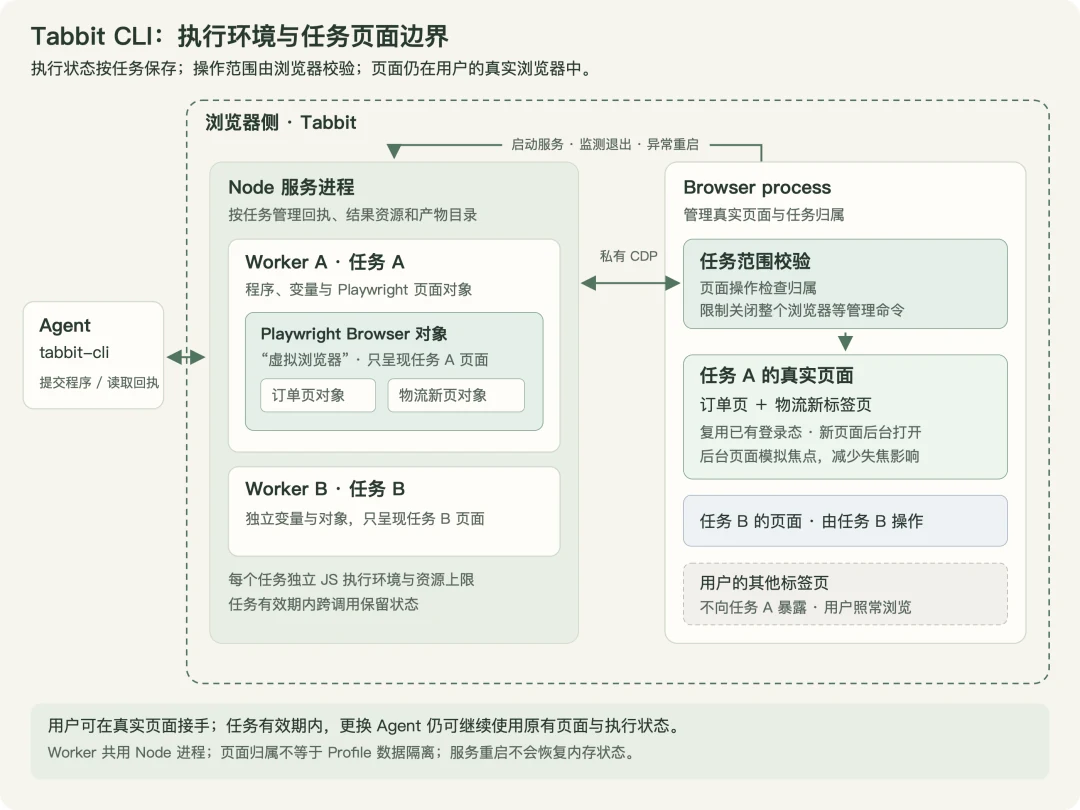
Figure 4. Execution environments and page boundaries. Workers on the left hold separate program state; the browser on the right manages real pages and validates ownership. A virtual browser means the objects visible to a task, rather than a separately launched browser.
Limit page access by task. Tabbit builds a virtual browser containing only the current task's pages, still running in the user's real browser. The agent can operate only those pages, and management commands such as closing the whole browser are restricted. Other user tabs are invisible and unavailable to the task. This reuses the user's login state, allows normal browsing to continue, and keeps execution independent of the agent session. While a task remains valid, its pages and state can survive an agent restart or a switch to another agent.
Task lifecycle and boundaries. After 90 seconds of inactivity, a named task releases page ownership and clears JavaScript variables. Queued or running programs do not expire as idle. Pages remain and can be reclaimed. An agent can also finish a task explicitly, releasing its execution environment, receipts, and result resources. Browser or runtime restarts do not automatically restore in-memory progress. Task isolation restricts the agent's access; the user can still operate the same page. After a manual change, the agent must observe and verify again before continuing submissions.
2.3 How an agent works
Agents generally operate websites through an observe, act, and verify loop: inspect the page, choose the next step, execute it with a tool, and check the result.
Observation, interaction, and verification can use three approaches:
Semantic: read control information such as a button named Confirm reshipment, locate it by role and name, then simulate a click or text input.
Visual: inspect a screenshot, identify a target's position, then click or drag at its coordinates.
Scripted: execute JavaScript in the page to query its Document Object Model (DOM), read data, or invoke element methods such as click.
A task often combines approaches, for example using a button's name to enter a list, then extracting its data with a script. Figure 5 compares observation and interaction for the same Confirm reshipment button.
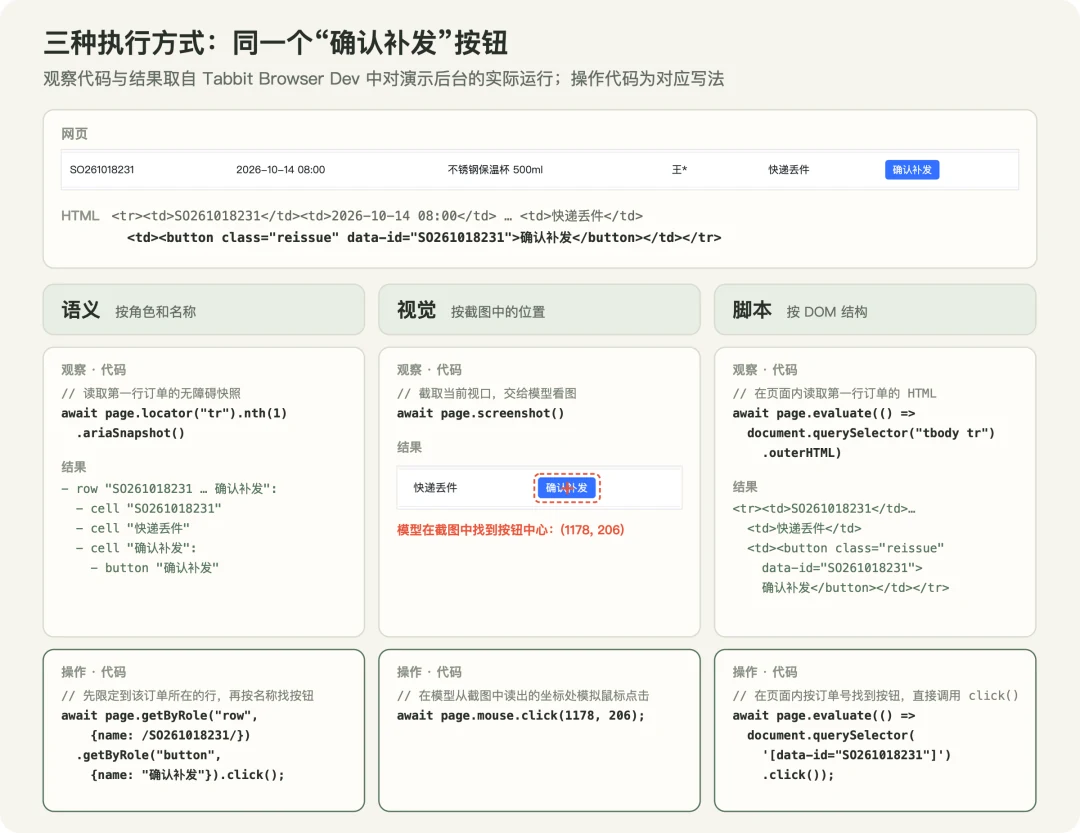
Figure 5. Three ways to operate the same button. Semantic interaction relies on correct roles and names and requires scoping when controls share a name. Visual interaction requires image input, and coordinates can become stale after scrolling or reflow. Scripts depend on DOM structure, may need updates after a redesign, and scripted clicks are not equivalent to real input.
While designing Tabbit CLI, we analyzed Playwright MCP, Browser Use, and Codex's browser extension, and experimented with Chromium's internal Actor framework.
We chose to let the model write familiar Playwright programs while the user's browser owns the runtime and task boundaries, returning structured results for each call. Semantic, visual, and scripted approaches can all be combined within this environment.
Preserve native Playwright syntax and extend existing capabilities. Reusing Playwright lets models retain familiar patterns and reduces the context needed to understand custom interfaces. It also reuses mature element resolution, action timing, and actionability checks.
Actor is Chromium's new built-in webpage interaction framework. We experimented with using it as Playwright's backend instead of CDP, executing concrete page actions inside the browser.
The experiments showed that rebuilding the interaction layer still requires solving problems Playwright already handles well. Behavioral differences from the CDP implementation also require substantial adaptation.
We also found models made more mistakes with nonstandard Playwright APIs. Descriptions in a prompt do not always override habits learned during training. Our shorthand for this lesson is: what is in the training data has more influence than what is in the prompt. Tabbit therefore preserves familiar call syntax and focuses adaptation on information gathering and result delivery.
The working loop requires the model to choose actions from observations. When native interfaces do not supply enough information, Tabbit first adds information or changes how it is delivered. Two changes illustrate this:
Add interaction clues to page snapshots.
For semantic interaction, Playwright's page.ariaSnapshot({mode: 'ai'}) converts the accessibility structure into text describing control roles, names, and states. But some checkboxes are hidden and users actually click a visible adjacent label. Tabbit appends DOM hints explaining that relationship and providing a label selector. The model can choose the right entry point while Playwright still executes the click with its native actionability checks.
Provide a delivery path for screenshots.
Visual interaction requires the model to actually see an image. Native page.screenshot() returns bytes that cannot become image input through a textual CLI receipt alone. Tabbit saves the screenshot as a separate file and returns its path, dimensions, and loading instructions. The host can then supply it to an image-capable model. The familiar screenshot call remains, while the return value and delivery mechanism change.
Add explicit capabilities when coordination needs more than extra information. A model may not know whether clicking will open a page or update the current one. Observation needs to begin before the action to capture events as they occur.
Tabbit provides tabbit.triggerAndObserve() to coordinate actions and observation, while tabbit.observe() summarizes task pages, frames, and focus. They share Playwright's page objects and fit into the same program.
The model requests additional observation when needed. Native clicks do not gain hidden waits or changed timing and failure conditions.
Return structured results showing what happened during execution. Verification often requires more than a program explicitly returns: did the page navigate, open a new tab, show a dialog, or encounter a failed request? Models may not anticipate these events or write checks for them. The runtime records observable changes centrally and returns them with program results when needed. After a failure or interruption, it highlights possible changes and suggested next steps. The model can continue, inspect further, or hand control back without rewriting generic state collection in every program.
This feedback supports verification, but a successful program return does not prove business completion, and an interruption does not prove that nothing changed. When results are uncertain, inspect the page or business records before deciding what to do next.
Tabbit adapts languages models already know and automation frameworks the community has already tested to agent use. Models continue organizing actions with JavaScript and Playwright. Tabbit places programs in a task environment inside the user's browser and adds observation and execution feedback so each result supports the next judgment. The following example shows these choices working together.
3. A worked example: reshipping orders lost in transit
Consider an ecommerce operator processing after-sales orders.
Some pending orders need reshipment because packages were lost; others have different after-sales reasons. The operator wants an agent to find lost packages, check tracking, and submit replacements, handing back cases that need human judgment.
The user is already signed in to the supplier's backend with the order page open, and asks:
Reship orders lost in transit to their original addresses. If an address has changed, leave it for me to confirm. Leave other reasons untouched, and verify the records when finished.
There are 26 pending reshipments across three pages; nine involve lost packages. The fifth target order prompts an address-change warning. The orders and scenario were designed for the demonstration; page identifiers, screenshots, and results come from an actual run.
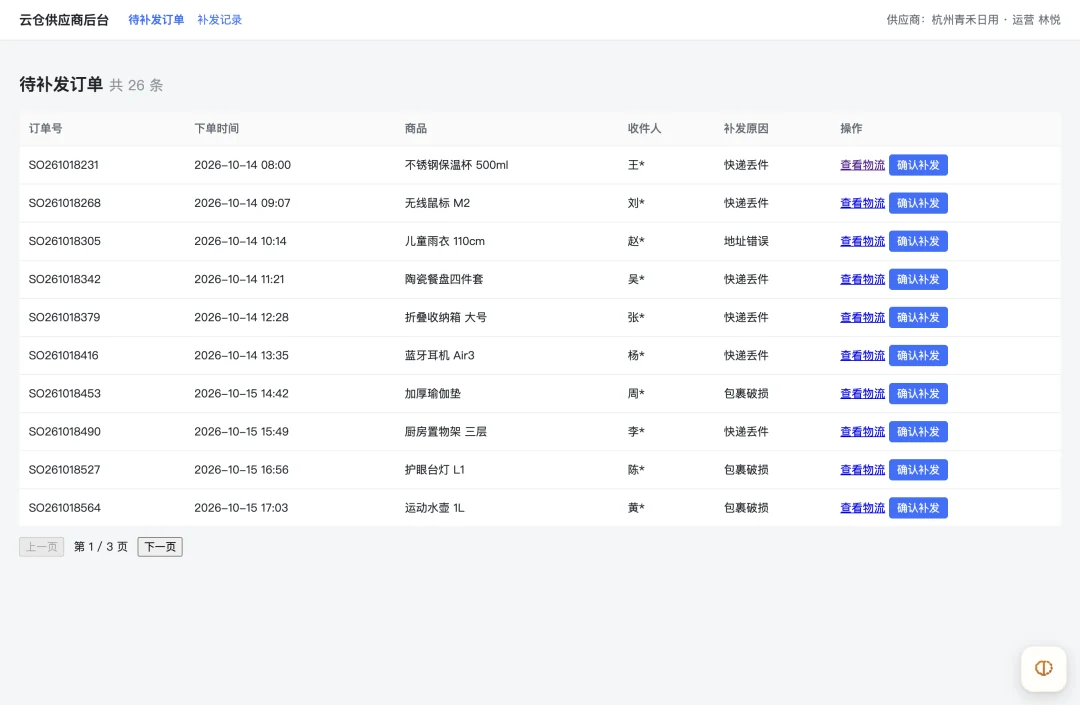
Figure 6. The original webpage before any operations.
1. Find and acquire the user's existing page. The agent lists tabs and identifies Pending reshipment orders by title and URL. Of ten open tabs, target tab 770865107 is available. A claim call brings it into the task:
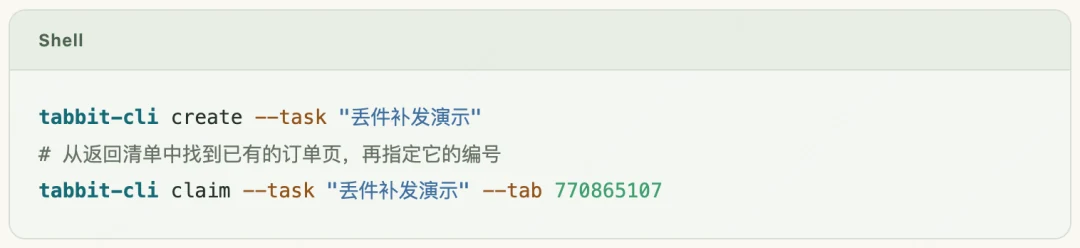
The receipt's ownedPageCount: 1 means the task owns only this page. Its login state is ready to use, while the other nine tabs remain available for normal browsing. A claim determines which pages the task can operate, without launching a blank browser or requiring another login.
2. Read and filter orders in batches. The agent inspects table columns and the Next button, establishes a filtering rule, and submits a program that reads all three pages. It returns scanned: 26, pagesRead: 3, targetCount: 9, and nine order numbers. The full table is processed in code; the model receives the target list directly. The runtime saves that list and processing progress for later calls.
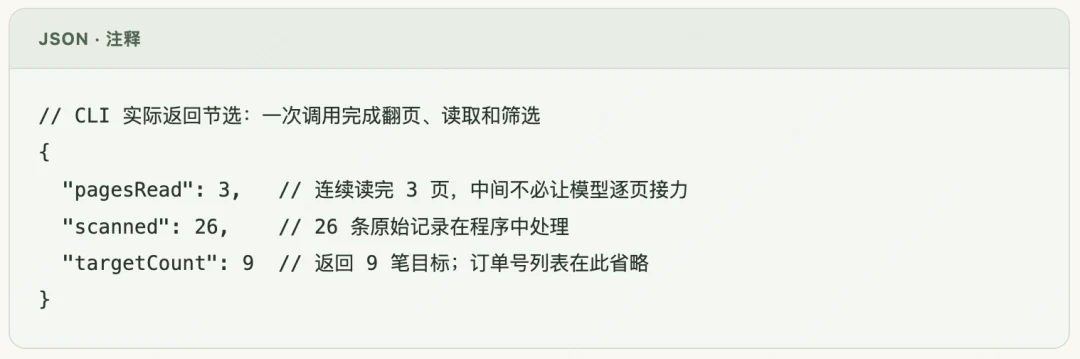
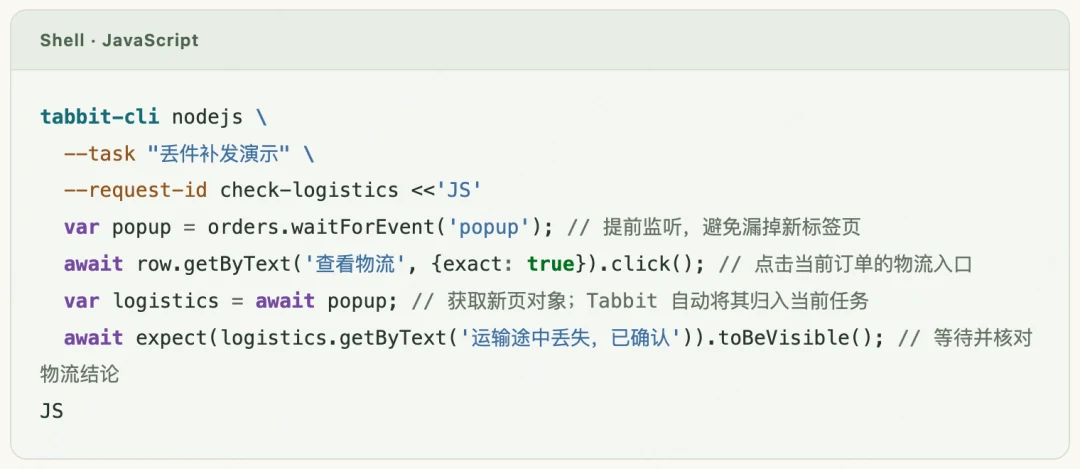
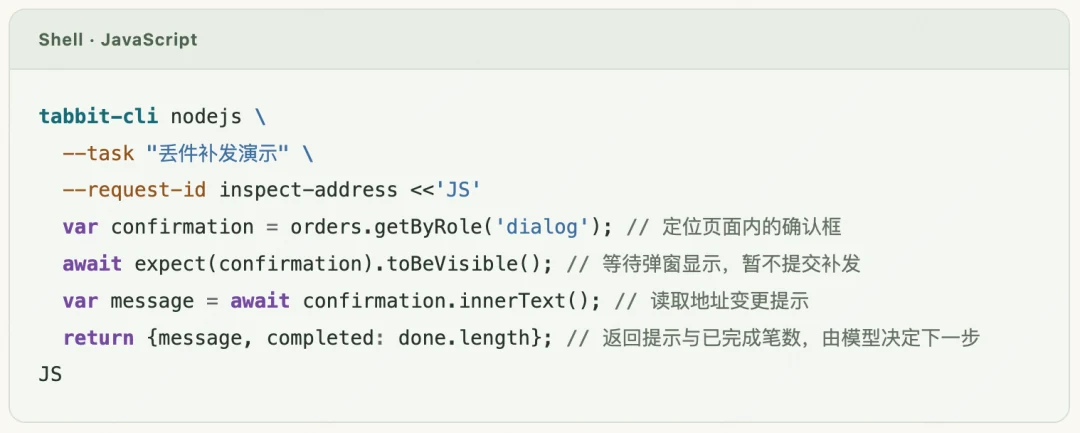
The following commands reuse the Lost-package reshipment demo task. Each submission shows only four core lines; variables and page locators were initialized earlier. resendAndVerify wraps reshipment and success verification, returning false on an exception.
3. Acquire the tracking page, verify, and reship in batches. Clicking View tracking on the first order opens a new tab. Tabbit automatically adds it to the task; the receipt's page count rises from one to two and includes its URL. After reading Lost in transit, confirmed, the agent returns to the order page. Once dialog and success-message rules are clear, the program completes the first four orders in sequence: find the row by order number, confirm reshipment, wait for Submission successful, then continue. The user's visible page need not change.
4. Pause before submitting a changed address. Order SO261018416 shows a dialog asking whether to reship to a new address. The program detects unexpected confirmation text and stops before submission, returning the dialog, order number, and progress: four completed, five remaining. Following the user's instruction, the model cancels this reshipment and flags the order for confirmation.
5. Continue from saved progress in the next call. The order page, tracking page, nine targets, and four completed orders remain in the same task. The agent cancels the dialog, defers this order, processes the remaining four, and checks each entry in Reshipment records. Eight replacements are complete; one awaits the user's confirmation because its address changed.
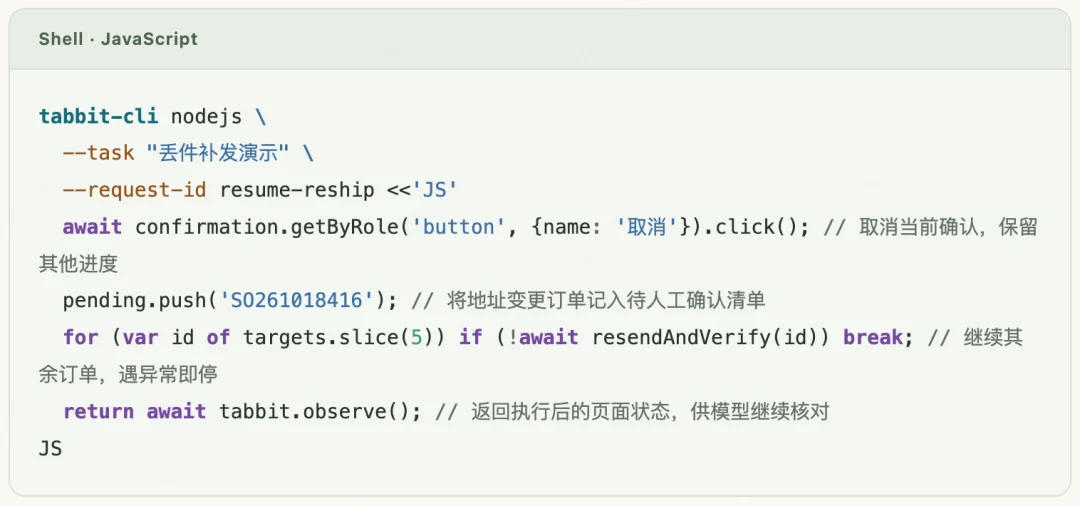
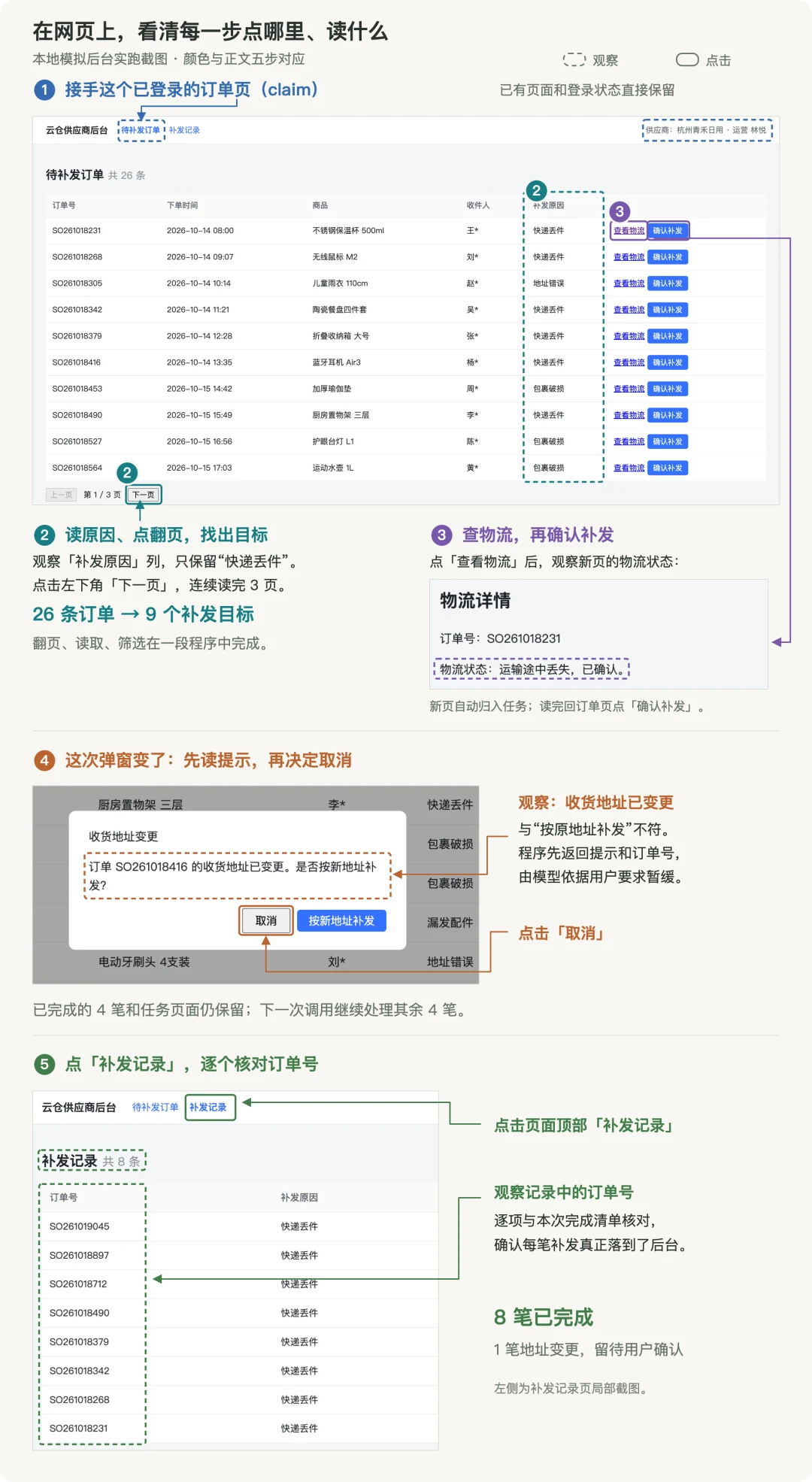
Figure 7. Click and observation positions annotated on screenshots from an actual run of a local simulated backend. Five colors match the steps above. Dashed boxes mark observation areas; solid boxes mark clicked controls. Tracking, dialog, and records views are enlarged details.
The run completed the other orders and left the changed address for the user. They can handle it in the same browser. If the agent resumes, it must observe and verify the current state. If the task has expired, it must reacquire the page and recover progress from business records.
4. Practical lessons from Tabbit CLI and Skills
Tools supply capabilities; Skills guide models in using them. Iterating on both produced several lessons:
1. Skills have input overhead too. When the main document grew from 154 to 724 lines, its share of input tokens rose from about 4.0% to 6.6%. We adopted a layered design: common workflows stay in the main document; scenario-specific details move into references with clear reading conditions; state-dependent guidance comes through receipt fields such as transition, issues, and nextAction.
2. Examples are adopted more readily than prose. In our tests, prose recommending concurrency for independent sources led to concurrent execution in only 4% of runs. Replacing it with a code example raised that to 63%. Skills should show directly adaptable examples of existing capabilities and recommended workflows.
3. Encourage batching to reduce model rounds. Tabbit can execute a complete program in one call. Skills guide the model to combine predictable actions and verification, such as pagination, reading, and filtering. This reduces round trips in which the model receives a result, reasons, and generates another call. Guidance also defines stopping conditions: return relevant information when a new business judgment or unexpected state arises, then decide the next step.
4. Use caching and encourage targeted observation. Input-token cache hit rates in our experiments were about 89–93%. Stable instructions and conversation history can be reused; new observations should balance sufficient information with a bounded return. Skills explain when to inspect: identify regions and controls on first entry, inspect changed targets after a new page or dialog, and check success messages and records after submissions. Parameters such as frames and maxChars in tabbit.observe() bound results, while guidance helps the model decide when more information is needed. Checks for known steps stay inside batched operations.
5. Process data in JavaScript and define what to return. Batching reduces round trips; in-program processing reduces the information delivered in each one. For long lists, Skills encourage page.evaluate() to read records in bulk, then filter, deduplicate, and count in the runtime, returning only candidates and statistics. Semantic interpretation and business decisions remain with the model. Examples show both the computation and the bounded return:
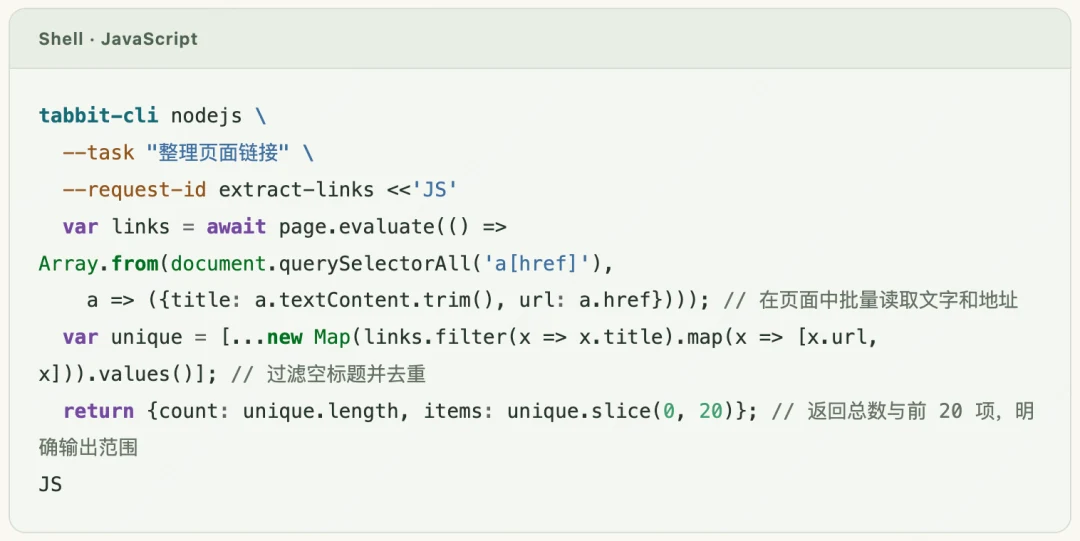
JavaScript is suited to extraction and calculation. Clicks and typing still use Playwright Locators to preserve waiting and actionability checks.
These lessons also apply to task prompts: supply a few representative examples, define goals, stopping conditions, and verification requirements, keep instructions concise, specify what to return, and explicitly encourage JavaScript where useful. This gives the agent concrete guidance on how to complete the work.
5. Evaluation results and scope
5.1 Evaluation setup and results
We compared Tabbit CLI with Codex's ChatGPT browser extension using 25 tasks from Browser Use's BU Bench V1.
The tasks came from WebBench, Online-Mind2Web 2, interaction tests, GAIA, and BrowseComp, covering retrieval, cross-site synthesis, complex page operations, and multistep reasoning.
Both approaches ran in the same host, Codex CLI 0.144.1, with the same model, gpt-5.6-luna at medium reasoning. Each used its own browser interfaces, instructions, and result delivery.
Each task ran three times in a preregistered order. A model unaware of the answer's source graded the results.
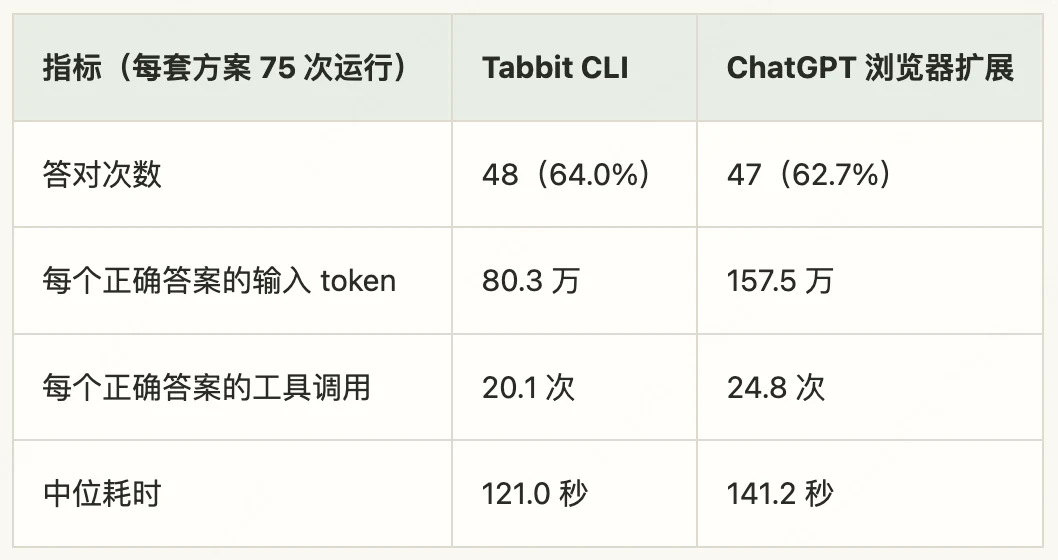
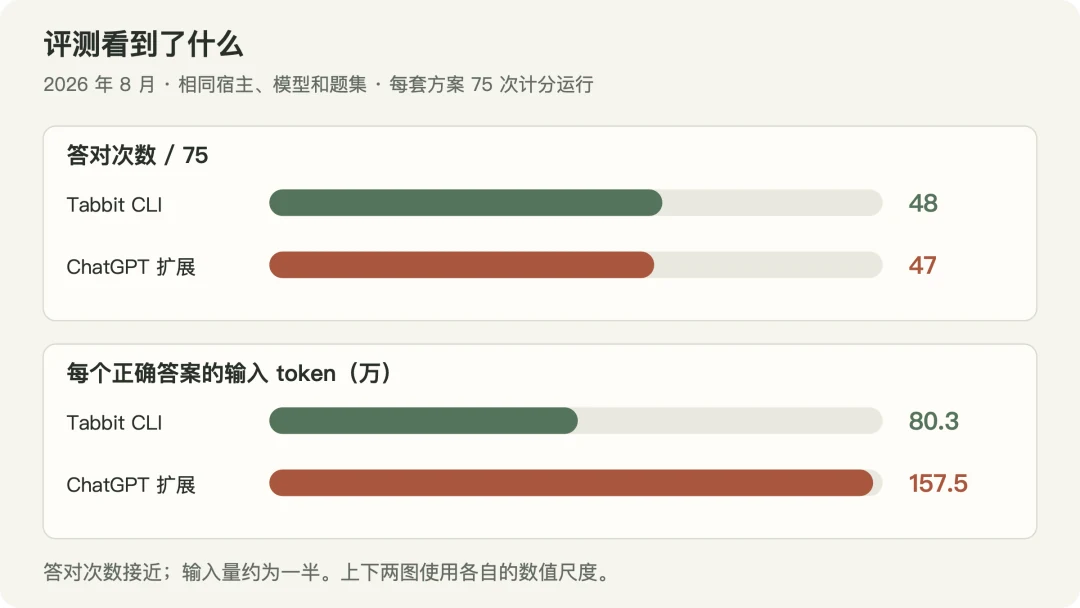
Summary over 75 runs (Tabbit CLI / ChatGPT browser extension): 48 correct (64.0%) / 47 correct (62.7%); 803,000 / 1,575,000 input tokens per correct answer; 20.1 / 24.8 tool calls per correct answer; median duration 121.0 / 141.2 seconds.
Figure 8. August evaluation: similar numbers of correct answers, with a larger difference in input usage. Input per correct answer divides total input across all 75 runs by the number of correct answers, including failed-run overhead and without adjusting for cached-token pricing.
5.2 Turning model capabilities into task efficiency
The approaches answered 48 and 47 of 75 runs correctly, respectively. Completion counts were close; execution overhead differed more clearly.
Across the 40 matched task pairs both answered correctly, Tabbit CLI used fewer input tokens and tool calls, with roughly the same output volume:
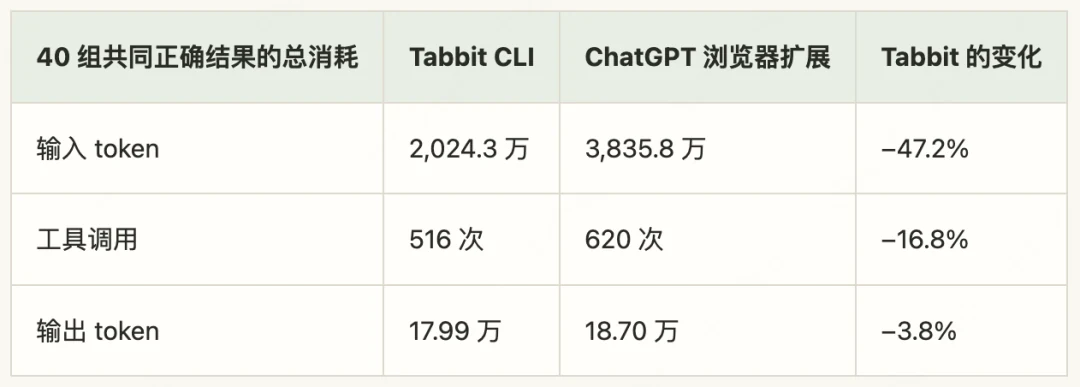
Across 40 matched correct results (Tabbit CLI / ChatGPT browser extension): 20.243 million / 38.358 million input tokens (−47.2%); 516 / 620 tool calls (−16.8%); 179,900 / 187,000 output tokens (−3.8%).
These figures compare complete approaches. The following analysis considers possible causes using execution records and engineering experience.
One generated program can express rules to execute repeatedly. Loops, conditions, and variables let a model write a method once and have code apply it, passing intermediate results to later steps. Cloudflare's Code Mode discusses the same idea: code can pass data between tool calls, reducing the model's need to read and copy it. Here, lower input with similar output suggests the savings did not require more total output. Both approaches support JavaScript, so the useful questions concern the programs models actually generated and how Skills encouraged them to use these capabilities.
Keeping task state does not require returning all of it to the model repeatedly. During a task, Tabbit can retain intermediate data in variables and result resources for selective retrieval. Material that enters model context affects later rounds: tool results remaining in conversation history may be input again. Filtering data in code therefore benefits subsequent rounds too, while large early returns of irrelevant content can be counted repeatedly. Concise returns should preserve sources and a path to read more, allowing the model to inspect exceptions.
Figure 9 illustrates the difference. To find the five Stack Exchange communities with the most daily questions, one Tabbit extraction read and sorted 183 records in the runtime and returned only the top ten candidates. The model could still verify candidates without placing the full list in conversation history.
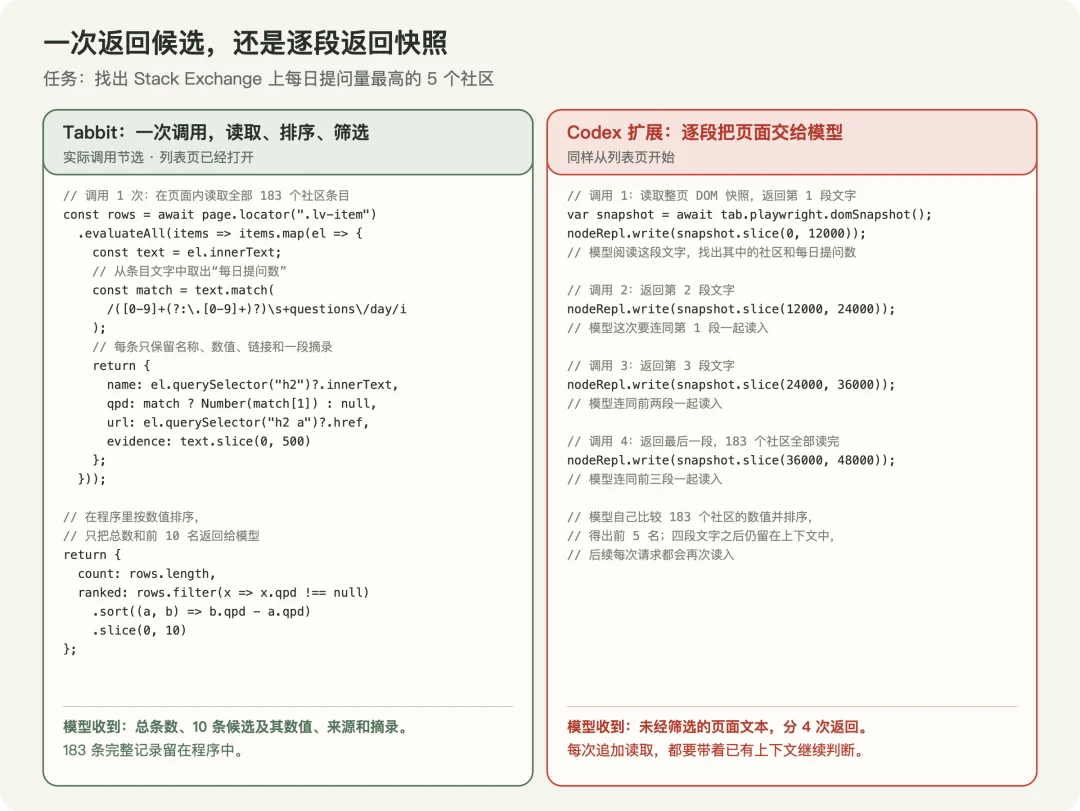
Figure 9. Returning candidates once versus returning snapshots in successive chunks. The left side comes from a real Tabbit extraction; the right illustrates the overhead of reading snapshots in pieces.
Observation can be generated on demand while execution retains mature semantics. In The Bitter Lesson of Browser Agents, Browser Use describes moving from a fixed page representation to observation code written by the model. Our takeaway is that preserving Playwright interaction semantics does not require a single predefined observation for every task. Models can combine snapshots, screenshots, and DOM queries while relying on a mature framework for common locating and waiting. Tabbit gives models room to choose observations and organize programs while reusing established execution capabilities.
Tabbit CLI's advantages vary with models and tasks. Return granularity, examples, and batching scope need ongoing validation and adjustment. Its core value is to turn improving model programming and judgment into everyday task efficiency, making the browser a workspace where users and agents collaborate.
In 1991, computer scientist Mark Weiser, who introduced ubiquitous computing, described the most profound technologies as those that disappear into everyday life until they become indistinguishable from it.
Browser technology has followed that path: WebView, Electron, and mini programs have embedded browser engines throughout applications. We hope Tabbit similarly becomes part of the working environment for AI and agents.
To try Tabbit CLI, enter /tabbit in an agent tool such as Codex or WorkBuddy to let it operate your real Tabbit browser.
If you have not installed Tabbit, visit www.tabbit.ai to download the desktop browser for free.
To try Tabbit on mobile, search for Tabbit in your app store. Sign in to the same account to sync bookmarks, tabs, and other browsing data through the cloud.
References
Playwright auto-waiting and actionability
Chrome remote debugging security changes (March 2025)
ChatGPT browser extension documentation
Product versions: Tabbit Browser Dev 1.20.5 (demonstration), Tabbit 1.13.8 (August evaluation); Codex CLI 0.144.1; ChatGPT browser extension versions 1.26.1005 and 1.26.1015 (execution records); Codex-side chrome plugin version 26.1007.30912 (interface documentation).
