
Tabbit desktop version 1.14 is here.
In this release, we are experimenting with integrating DeepSeek Harness directly into Tabbit. Open tabbit://local-tools to install and launch it with a click, without complicated command-line steps, making the AI development environment much easier to use.
A new Notifications feature shows product announcements, service updates, and membership and payment notices. Conversation Outline and Search makes long-chat history easier to navigate. Flexible custom cloud-sync settings and a built-in extension management section, including uBlock Origin, are also new.
PDF and Markdown reading and annotation are substantially improved. The browser engine upgrades to Chromium 152 for better web compatibility and stability.
Mobile v0.50 introduces Campus Skills and the Tabbit Savings Assistant, along with Skills 3.0. Quick actions for past AI replies and improvements to browsing interactions make the mobile experience smoother.
Here is the full changelog:
Desktop 1.14
Added Notifications. Open the feature menu at the top left of the home screen to see product announcements, service messages, and membership and payment notifications.
AI features
Improved global smart screenshots:
Added screenshot buttons to the Tabbit quick launcher and browser toolbar.
Integrated the chat screenshot entry with the global screenshot feature for a consistent experience.
Improved screenshot stability and fixed known issues.
Added Conversation Outline and Search to the chat sidebar, letting you quickly search and locate earlier messages in long conversations.
When referencing a tab with “@” in a conversation, tabs are ordered by how recently they were opened, making recent pages easier to find.
Improved the presentation of multi-model replies.
Added parsing support for .srt subtitle files and .xlsm Excel macro-enabled workbooks.
Built-in DeepSeek Harness, experimental
We are experimenting with an integrated DeepSeek Harness (DSH) environment. Install and enable it at tabbit://local-tools.
Once installed, it runs inside Tabbit. Start it with a click instead of complicated command-line operations.
API usage is not currently integrated with Tabbit usage allowances. We sync DeepSeek API key configuration from other DSH installations on the same computer; you can also add and manage keys in settings.
Skills
Improved Skill installation and execution. Automatically running Skills now show a confirmation before installation and execution.
The Skill Marketplace's left sidebar can be collapsed, and its mobile layout has been improved.
Core browsing
Upload an image to use as a custom avatar.
Added Cloud Sync under Settings → Account → Data Management. With Custom Sync, choose which data types sync across devices signed in to the same Tabbit account. Unselected data stays on the current device. Turning sync off keeps all data local.
Built-in extensions
Added a Built-in Extensions section under Settings → Extensions.
Tabbit includes the MV2 version of uBlock Origin, disabled by default.
Other built-in Tabbit extensions can also be managed and configured here.
Improved PDF reading:
Added a hand tool for dragging and panning pages.
Follow links within PDFs.
Add highlights and underlines, and choose whether to preserve your changes when saving locally.
View document properties, permissions, digital signatures, comments, and highlights.
Check off task-list items directly while previewing Markdown files.
Engine and stability
Upgraded the browser engine to Chromium 152.0.7977.65 for better security, web compatibility, and stability.
Fixed known issues to improve browser stability and usability.
Mobile v0.50
Added Campus Skills. After student verification, browse and use a wide selection of Skills for campus life.
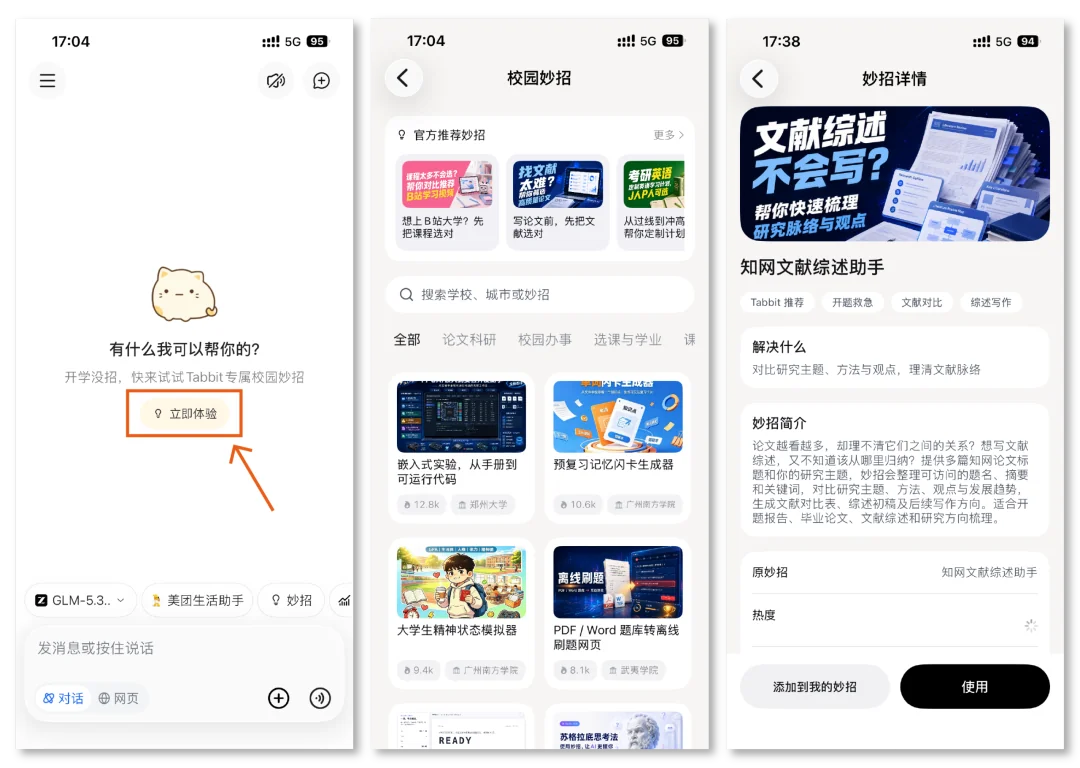
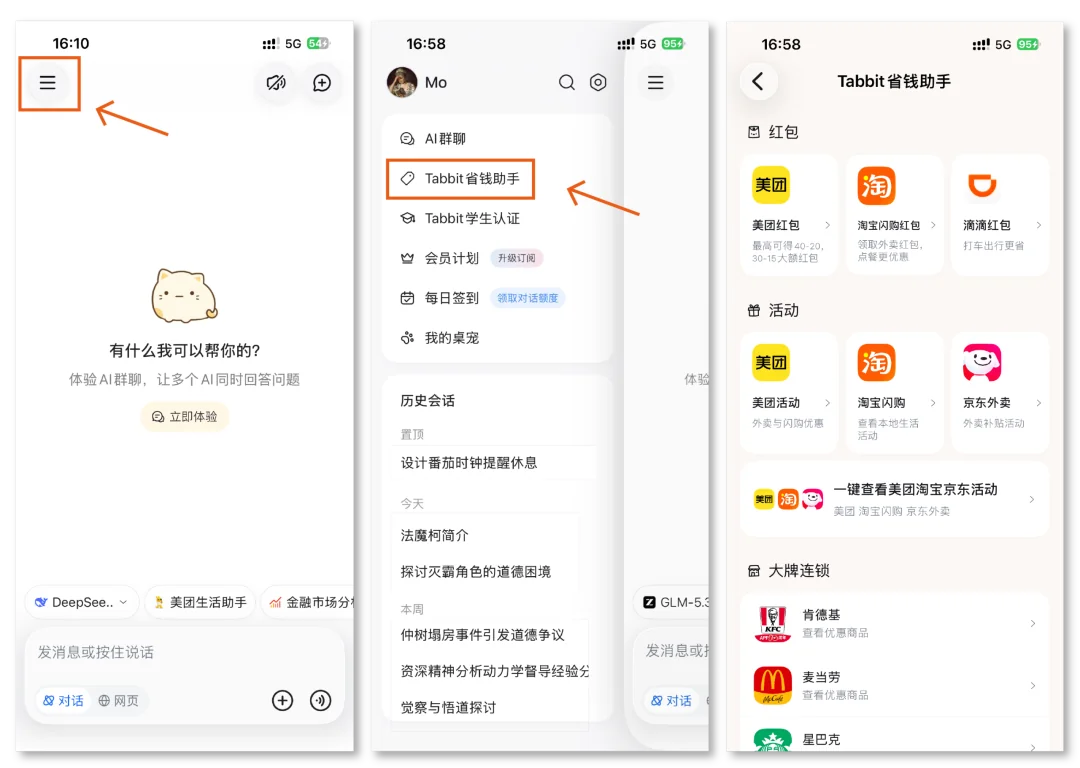
Added the Tabbit Savings Assistant to the left sidebar, bringing coupons, platform promotions, and brand offers together.
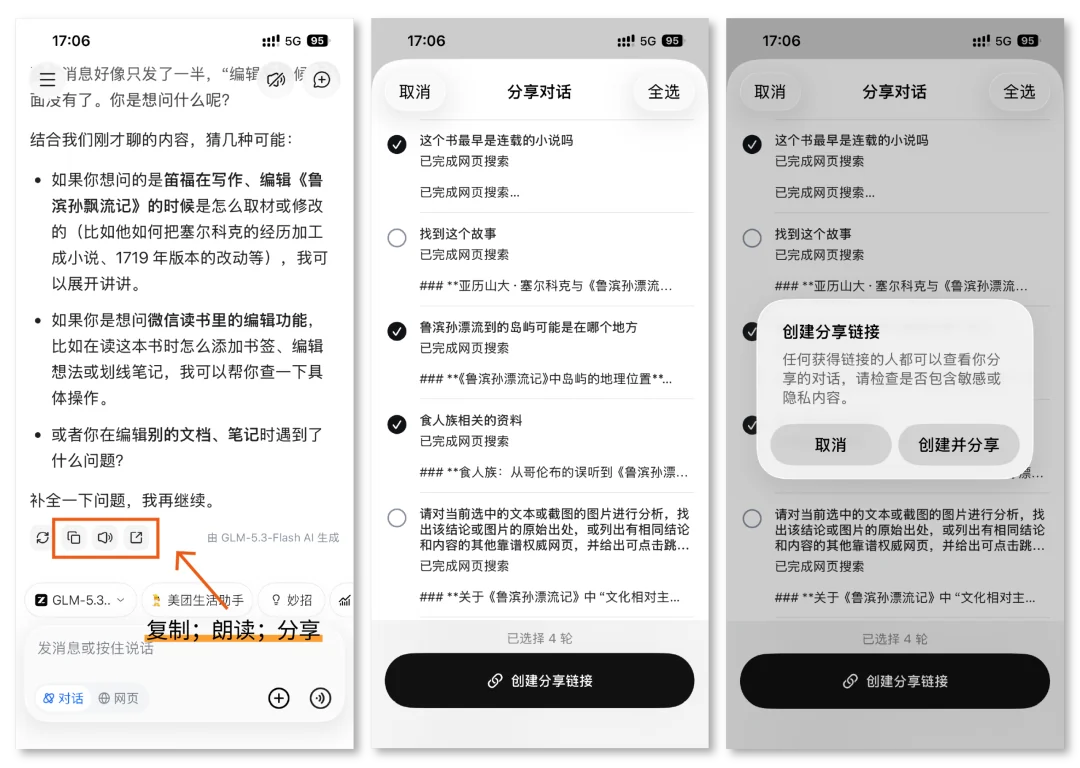
Improved AI chat: quickly copy, read aloud, and share past answers, or cancel message editing with one tap.
Improved long-chat loading, sidebar scrolling, and pinch-to-zoom on webpages. Fixed stuttering and interaction issues.
Added support for the new Skills 3.0, improving both use and creation.
Added promotional popup notifications to help you keep track of new activities and benefits.
Improved web browsing and interactions, fixed known issues, and enhanced app performance and stability.
Some improvements in this release came from feedback and suggestions from these Tabbit users:
120*/6396@qq.com 30*/1585
176*/4191 291*/9151@qq.com
155*/4546 ln*/shi 183*/0101
zha*/boy@qq.com ue*/2004@gmail.com
Thank you for supporting Tabbit and helping us grow.
If you have not tried Tabbit, visit www.tabbit.com or follow the original article link to download the desktop app for free.
Search for Tabbit in your app store to try the mobile app. Sign in to the same account to sync bookmarks, tabs, and other browsing data through the cloud.