
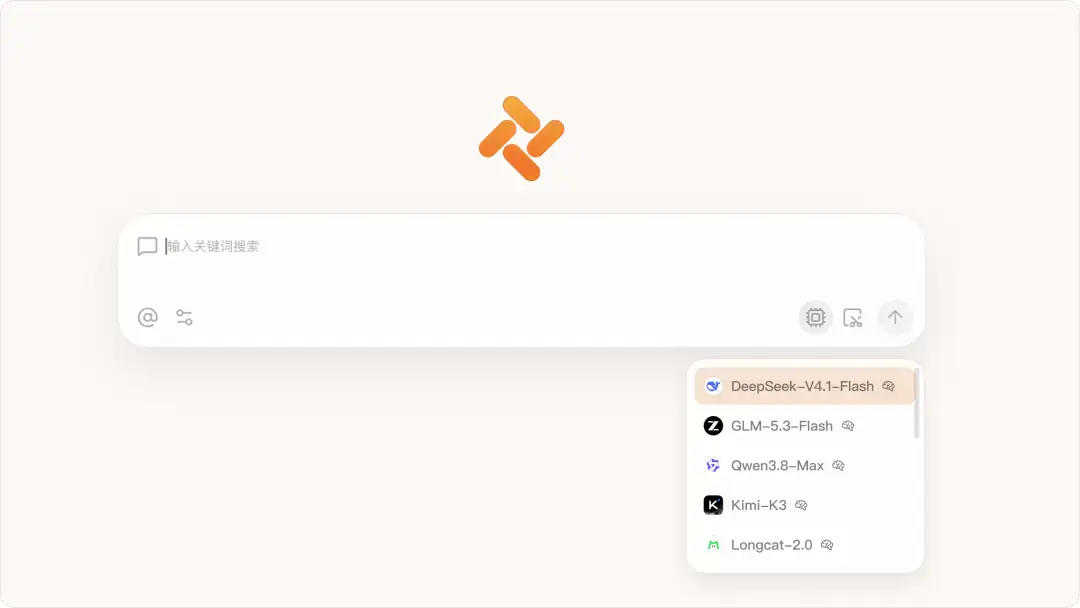





This time, the Tabbit Browser desktop app has been updated to version 1.13, and the mobile version has been simultaneously upgraded to version 0.49. Important upgrades have been made in multiple dimensions such as AI capabilities, Skill ecosystem, local file editing, and basic experience. A variety of AI models such as DeepSeek-V4.1-Flash have been added to the desktop, and a practical "global screenshot" function and Tabbit CLI tool have been launched - now you can directly call Tabbit in code agents such as Codex and Cursor to perform browser tasks. Skills Gallery has received a comprehensive refresh, from the interface, details page to the creation and release process. At the same time, the invitation to friends to receive Pro membership activity is released. Welcome to share it with more friends. The mobile version focuses on optimizing conversation fluency and file preview experience, and adds a new campus Skills module. Detailed updates are as follows:
▍desktop app 1.13
✦ AI: DeepSeek-V4.1-Flash and DeepSeek-V4-Flash-Vision-Exp are now available. Tabbit CLI lets coding agents such as Codex, Cursor, and WorkBuddy call Tabbit for browser operations and webpage tasks—enter /tabbit to give an agent a fast, token-efficient browser that shares your signed-in session. A new global screenshot tool (Alt + Shift + E on Windows or ⌘ + ⌥ + E on macOS) supports follow-up questions, basic editing, translation, OCR, saving, and collecting images. The new Financial Market Analysis Skill uses Tonghuashun iFinD data.


✦ Skills: The Skills Gallery has been redesigned with a cleaner interface and filters for prompts, webpage scripts, and task-based Skills. Skill detail pages now show install counts, version history, and release notes; task Skills also expose their SKILL.md and can be installed, tried, updated, or removed directly.
Skill management is easier: your library is organized into official, installed, and custom Skills with search and type filters. Installed Skills now support version management, examples can be tried with one click, and Skills that do not work on the current site are clearly marked.
Skill creation and sharing have also been upgraded. Your working draft is now separate from the published version, so edits do not go live until you submit an update. The release flow supports a public description, version number, release notes, cover, visibility, originality declaration, and usage rights. Installed users receive an update prompt when a new version ships.

✦ Local file preview Markdown file preview and editing capabilities are further enhanced: - Supports search and replace, smart format pasting, saving pictures to local, and supporting outline following; - Supports table formatting functions and more editing shortcut keys; - Supports more Markdown format rendering: footnotes, prompt blocks and SVG content; - Automatically reads Markdown H1 titles as tab page titles; Subtitle file editing experience upgrade: - Added multiple views such as timeline, plain text and source code; - Supports subtitle search, time jump, item-by-item copy and file information inspection; - Supports conversion to UTF-8 encoding, and can be exported to .srt, .vtt or plain text files; Local file preview and editing have added more practical functions: - File directories support list and grid views, and can be sorted by different conditions; - .yaml, .toml files support tree preview; - Code and text files support search and replacement.
✦ Promotions and benefits: A new referral program in the user center rewards you with additional days of Tabbit Pro when invited friends start using Tabbit.
✦ Desktop Pets: New mini-games and leaderboards let your pet take part in challenges. Eligible custom pets now support creator-made outfits that can be designed and published for other users.
✦ Basic experience Fixed some known issues to further improve the stability and user experience of the browser.
▍Mobile version 0.49 Added new campus Skills, supporting browsing, adding and management, commonly used Skills are readily available; Optimized conversation experience, improved streaming replies and long session loading smoothness, optimized interactive experiences such as keyboard, sidebar and table sliding; Optimized in-app file preview and full-screen playback experience of web videos; Fixed some web page return exceptions and other known issues to improve the fluency and stability of the application.
Some optimizations and improvements in this update are based on feedback and suggestions from the following Tabbit users:
182*/7794 ai3*/0378@vip.qq.com
ym*/522 192*/8064
158*/9618 zru*/i123
Thank you all for supporting Tabbit and continuing to witness Tabbit’s growth.
For those who have not tried Tabbit, you can visit the official website www.tabbit.com or click "Read the original text" to download the desktop app for free. To experience Tabbit on mobile, you can search for "Tabbit" in various app stores and download it. Log in to the same account, and your bookmarks, tabs, and other browsing data can be synchronized in the cloud.