


Recently, the competition among office agents has entered a fierce stage.
From WorkBuddy, Qianwen Office, Doubao Work, to Codex, Claude, Grok Bot, to Kimi Work, Minimax Design, Z.ai Zcode, DeepSeek Harness, major manufacturers and model manufacturers are pouring into the office agent track.
In the process of vigorously rolling out Agent, everyone often overlooks the most basic execution carrier: the browser.
Most of our work requires the use of a browser. The collection, processing, and circulation of information, configuring the backend, and filling out forms... are all completed in web page tags.
Now that there are so many office Agents involved in work, it is important to open up the channel between Agents and browsers so that Agents can better understand your working environment and context so that they can complete delivery more accurately.
In the latest version of Tabbit, we have launched a function designed for Agents - Tabbit CLI, which allows Tabbit to not only assist you in your work, but also perfectly adapt to your Agent, becoming a powerful tool for them to travel through the web world.
Now just install the latest version of the Tabbit Browser and enter /tabbit in any Agent to let the Agent use your browser without grabbing your attention window.
▍Provide Agent with a faster and more token-saving browser
Let’s take a look at the professional evaluation results directly.
We directly compared Tabbit CLI with the world's mainstream Browser-Use solution, hoping to gain a more intuitive understanding of Tabbit's advantages and disadvantages so that we can better adjust the solution in the future:
→ Tabbit CLI
→ Codex Chrome Plugins browser control solution launched by OpenAI
→ Vercel Labs’ open source project Agent Browser browser control solution
01 Experimental design
●Benchmark: Select 25 questions from the BrowserBench question bank, covering five types of real work scenarios: web page reading, data research, web page interaction, fact question and answer, and multi-step retrieval.
●Number of runs: Each solution is run independently for 25 questions × 3 times, for a total of 75 times.
●Experimental execution environment: All use the GPT-5.6-Luna model, and use Max thinking intensity.
●Experimental result judgment: The experimental result is judged by another Reviewer model.
02 Experimental results
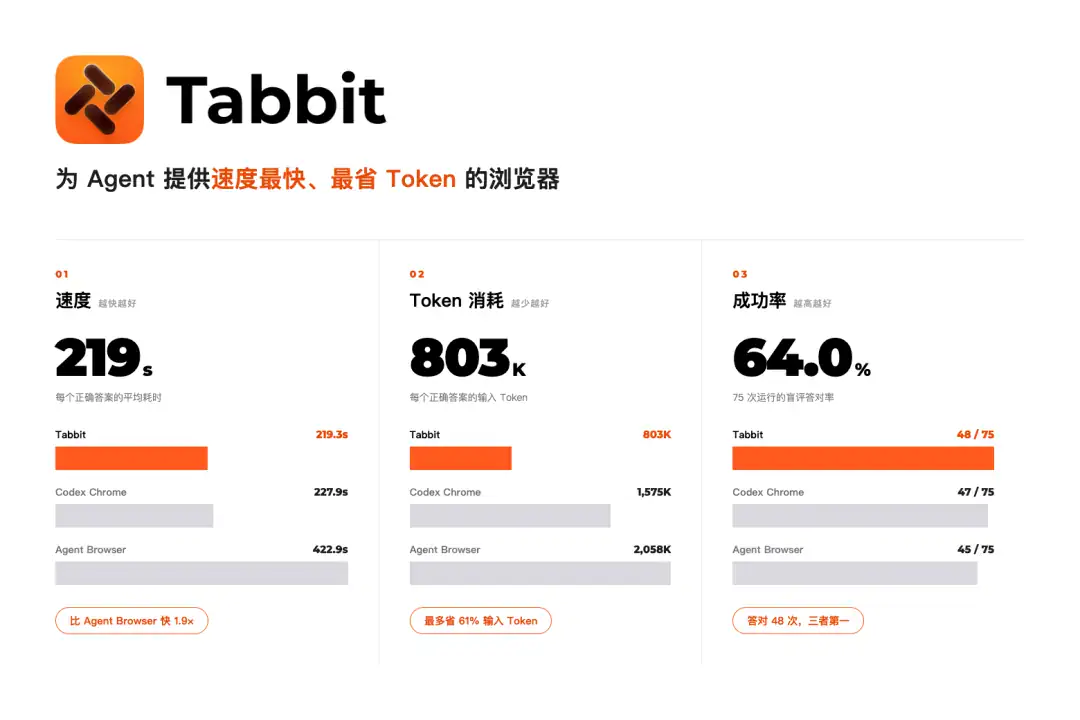
Under the same model capability and 75 runs, Tabbit answered correctly 48 times, with a correct rate of 64.0%, higher than Codex Chrome's 62.7% and Agent Browser's 60.0%.
Of the 25 questions, Tabbit had 16 questions answered correctly at least twice in three runs, and Codex Chrome had 14 questions.
Divide the total time, tokens and tool calls by the final number of correct answers to get the "true cost of each correct answer".
True cost of each correct answer
Tabbit
took 219.3 seconds, input Token 803K, output Token 7,417, and called the tool 20.1 times
Codex Chrome
took 227.9 seconds, input Token 1,575K, output Token 7,686, and called the tool 24.8 times
Agent Browser
took 422.9 seconds, input Token 2,058K, output Token 10,266, and called the tool 41.7 times
1.9×
Faster
−61%
Enter Token
−51%
Tool call
Compared with Agent Browser, Tabbit is 1.9 times faster, saves 61% on inputting tokens, and reduces tool calls by half.
Compared with Codex Chrome, entering Token saves 49%, tool calls are reduced by about 20%, and the time is also lower.
Overall performance of the three solutions
Tabbit
Correct answers 48/75 Correct rate 64.0% Median time consumption 121.0 seconds P90 220.6 seconds Total input token amount 38.55M
Codex Chrome
Correct answers 47/75 Correct rate 62.7% Median time consumption 141.2 seconds P90 224.2 seconds Total input token amount 74.00M
Agent Browser
Correct answers 45/75 Correct rate 60.0% Median time consumption 209.6 seconds P90 489.0 seconds Total input token amount 92.60M
Tabbit is not only faster on average, but also more stable for long-tail tasks: the median time is 14% faster than Codex Chrome and 42% faster than Agent Browser; P90 takes only 220.6 seconds, while Agent Browser reaches 489.0 seconds.
After running the entire set of questions, the total input token amount of Tabbit is only 52% of Codex Chrome and 42% of Agent Browser. The total time of 75 runs is also reduced from 5.29 hours of Agent Browser to 2.92 hours.
As far as the test results are concerned, Tabbit CLI is a set of execution interfaces with low latency, low consumption, and high success rate, which can allow the Agent to complete tasks faster and better.
At the same time, Tabbit’s advantage lies in its multi-threading capabilities, which can always maintain a good browsing experience.
When the Agent controls the browser, its execution will not seize your right to use it. You can also continue to complete other tasks in the browser, and then look back at the results after the task is completed.
▍Use Agents + Tabbit to take over browser control tasks
Next, let’s look at a few actual cases of Tabbit + Agent collaborative working:
Case 01 — Data Acquisition: Daily AI Daily
Browsers have always been an important window for us to obtain and browse information, and Agent is no exception.
Agent needs a real environment like a browser to obtain data.
Everyone has data that they care about for a long time. It is better to let Agent help you track it regularly or complete in-depth research.
, duration 00:45
WorkBuddy gets AI daily report
Case 02 — Self-media operation: Collection of popular items from Xiaohongshu
A large amount of work for self-media operators happens every day in the backend of Xiaohongshu, Douyin and official accounts.
You can try using /tabbit to browse image, text and video content and output high-quality scripts.
, duration 01:07
QoderWork View Xiaohongshu and provide copy scripts
Case 03 — E-commerce management: Youzan management backend
E-commerce operators often need to configure new products in the background, export business data, or fill in express delivery order numbers in batches after shipment.
These tasks can also be handed over to Agent and completed through /tabbit.
, duration 01:01
Codex entry product
Case 04 — White-collar office: Maintaining Feishu multi-dimensional tables
Many people's work data is maintained in Feishu multi-dimensional tables, and e-commerce operators often use multi-dimensional tables to manage business data.
You can try using Agent to control Tabbit to complete data updates and batch filling.
, duration 00:57
DeepSeek writes Feishu multidimensional tables
Case 05 - Financial Information: Tracking Stock Prices
You can set up scheduled tasks to let the Agent track the real-time prices of the stocks it follows every day.
Tabbit has also launched a dedicated financial analysis Skill, which can be used for related tasks.
, duration 00:40
Doubao works to check the stock price
▍How to use
Experiencing the Tabbit CLI is very simple:
1. Go to the official website to download the latest version of Tabbit Browser, download address: tabbit.ai (international version) or tabbit.com (domestic version).
2. In a commonly used Agent, describe the tasks you want to complete, for example: /tabbit Help me organize the information in the web page and generate charts.
3. Tabbit and Agent will work together to help you read web pages, organize information and complete tasks.
Okay, that’s it for today’s article.
You might as well open your Agent right away and try to let Tabbit join your workflow to help you collect the information you care about every day, or set up a scheduled task to see how it performs.
For those who have not tried Tabbit, you can visit the official website www.tabbit.com or click "Read the original text" to download the desktop app for free and try it out.
To experience Tabbit on mobiles, you can search for "Tabbit" in various app stores to download. Log in to the same account, and your bookmarks, tabs, and other browsing data can be synchronized in the cloud.
Overseas users can log in to www.tabbit.ai to download the latest version of Tabbit Browser.