
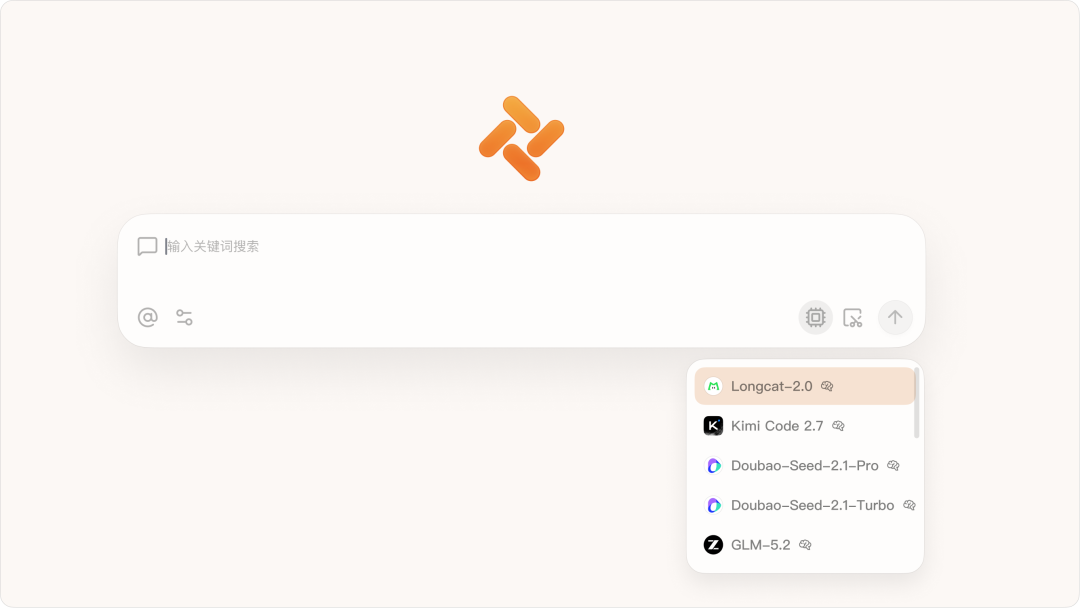
Version v1.3 is officially here. It adds cutting-edge models such as Kimi K2.7 Code, Doubao-Seed-2.1, and LongCat-2.0, plus a new image generation feature that makes creative expression easier. Core capabilities including the PDF reader, local file preview, and webpage translation have also been upgraded with more polished details.
On mobile, we added webpage AI chat and cross-device data sync, connecting desktop and mobile workflows more smoothly.
Memory, the desktop pet system, task mode, and other signature features are also continuing to improve, bringing a smarter and smoother everyday experience.
Here are the details:
Desktop
- Added the latest Kimi K2.7 Code, Doubao-Seed-2.1, and LongCat-2.0 models;
- Added image generation. Select the "Generate Image" task in a conversation, and Tabbit can create images based on your request;
- Improved the preview experience for local folders and local files:
- Folder expansion, current-file highlighting, subfolder navigation, and file switching are more stable, with better Chinese encoding detection and large-file chunked previews;
- Enhanced the PDF reader: added a left navigation panel for thumbnails, PDF outlines, and page notes, with support for full-text search, jumping to search results, text layers, and text read-aloud;
- Uses the browser's default preview window when opening files such as PDFs and HTML directly;
- Improved webpage translation stability, fixing cases where translation was triggered even when the target language was the same, as well as abnormal translation requests caused by blank or zero-width text;
- Added a memory toggle. You can turn memory on or off in Settings - Personalization - About Memory;
- Added a quick entry for the desktop pet system. Click the avatar in the top-right corner of the browser and go to "My Desktop Pet" to adopt your own pet;
- Optimized recommended scenarios and prompts in task mode, and improved PDF Skill processing;
- Supports deleting downloaded files from Downloads;
- Improved the install, upgrade, and uninstall experience on Windows devices for better stability;
- Fixed known issues in some models involving multi-turn conversations, image recognition, and LaTeX formula rendering;
- Fixed abnormal tab switching and tab bar display issues in maximized and fullscreen states;
- Fixed an issue where the floating vertical tab bar could not be resized by dragging, along with other known issues;
- Fixed several other known issues.
Mobile 0.35
- Added "Web Browsing" to the sidebar, supporting web browsing and search, tab management, browsing settings, and desktop data sync;
- Added webpage AI chat. While browsing a page, click the AI button in the top-right corner to chat with the current page context, with support for restoring history and continuous multi-turn conversations;
- Supports syncing browsing history and bookmarks across devices for smoother desktop-mobile continuity;
- Supports sharing files from apps such as WeChat, Lark, email, and file managers into Tabbit for browsing. Images, PDFs, Markdown, HTML, and other formats are supported, with conversations based on file content;
- Type @ in the input box to quickly switch models without leaving the current conversation;
- Supports copying selected text fragments, making webpage browsing and citation easier;
- Improved conversation stability.
Some of the optimizations and improvements in this update came from feedback and suggestions from the following Tabbit users:
142/*532@qq.com muz/*313@163.com
739/*191@qq.com lby/*809@gmail.com
357/*693@qq.com 330/*882@qq.com
Leo/*017@hotmail.com 384/*660@qq.com
kei/*s01@gmail.com yun/*.li@me.com
zjc/*997@163.com 268/*194@qq.com
251/*546@qq.com 320/*973@qq.com
lon/*h3@mail2.sysu.edu.cn hht/*213@gmail.com
216/*069@zju.edu.cn han/*ank@sina.com
tim/*ovo@zohomail.cn fra/*122@gmail.com
121/*55@qq.com huk/*uyx@163.com
shi/*ral@outlook.com 856/*66@qq.com
ljh/*r@163.com
Thank you all for supporting Tabbit and continuing to witness its growth.
If you have not tried Tabbit yet, visit the official website at www.tabbit.ai or click "Read Original" to download it for free.