
After 100 days in public beta, Tabbit Browser has finally reached the official V1.0 release. Alongside many new features and improved AI capabilities, we are also launching a mobile preview version. Everyone is welcome to download and try it.
There are also several activities for new and existing users: users registered before 23:59 on June 14 can receive a Pioneer Explorer commemorative badge; Tips Square is launching the Tips Contest; and the homepage now includes limited-time rewards such as invitation draws and newcomer task draws, with a 100% win rate. Do not miss them if you are interested.
Now, let's look at the specific updates:
New homepage design: a feature module button has been added in the top-left corner. Click it to quickly access pages such as chat history, favorites, Tips, scheduled tasks, and usage, making common features easier to reach and smoother to use.
The global input box now supports two modes: Q&A and tasks. Q&A mode is ideal for quick chats, concept explanations, and lightweight content generation. Task mode is suited to complex, long-running tasks, with support for generating files, operating webpages, writing webpage scripts, and running multiple tasks in parallel.
- The previous multi-model reply mode has moved to the model list in the lower-right corner of the chat box;
- When you type keywords in the chat box, such as PPT or spreadsheet, Tabbit recognizes them and recommends relevant tasks to improve generation results;
Tips Upgrades:
- Agent Tips upgraded: supports importing Agent Skill, allowing more complex tasks to run in the cloud and produce richer results. You can invoke Skill Creator directly in chat or upload an existing Skill file, and Tabbit will automatically parse it and adapt it into a Tip that can run in the browser;
- Previous Agent Tips have been migrated to Prompt Tips, with all historical content preserved. The model will automatically choose the right execution method based on the prompt content;
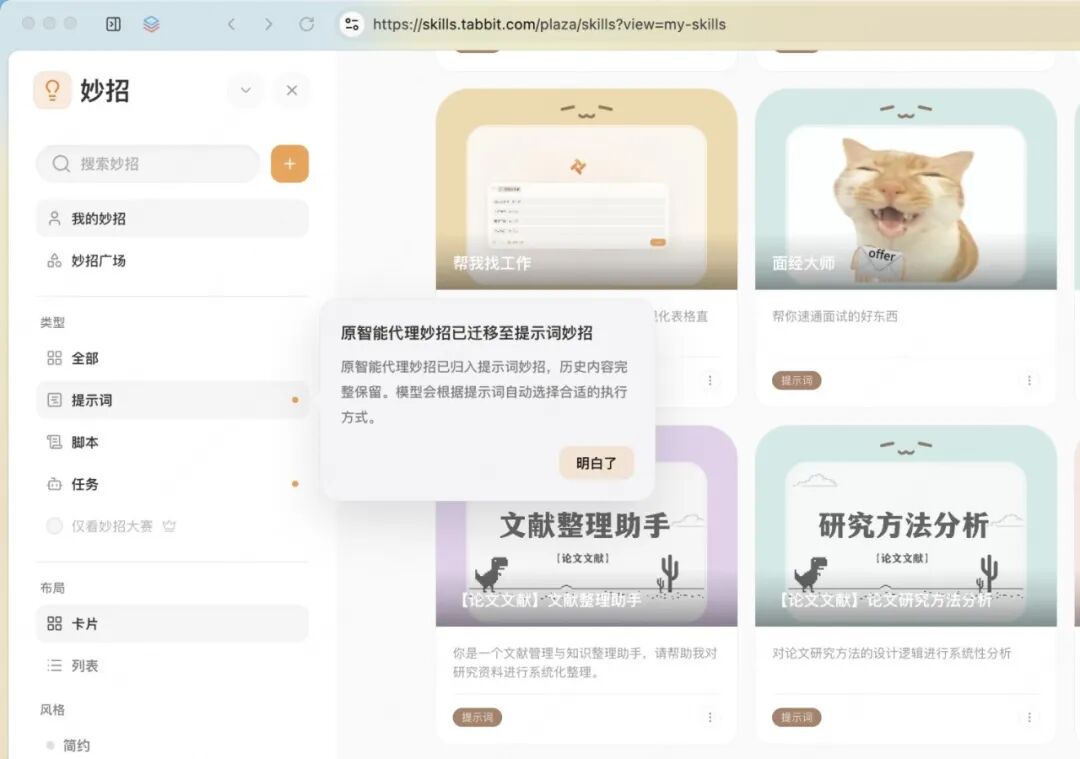
- Type "/" in the chat box to choose whether to create a Prompt Tip or a Task Tip;
Local File Browsing Improvements:
- Supports dragging local folders or files directly into the address bar to open them, and also supports right-clicking from the file menu to open them in Tabbit Browser;
- Displays local folder structures inside the browser and supports directly previewing file content;
- Supports previewing and editing text files such as Markdown (*.md), HTML, and code files;
- Supports previewing Office file formats;
Tabbit Mobile (Preview) Is Live:
- Released simultaneously for iOS and Android;
- Supports the full AI chat experience, so you can use AI anytime, anywhere;
- Supports cross-device chat history sync, with the toolbox connected to Tips;
Memory Is Live:
- Supports setting long-term conversation preferences in Settings - Personalization;
- Supports summarizing and compressing the current conversation when multi-turn context becomes very long;
- Supports memory across conversations;
- Memory content can be actively controlled through conversation;
Added "Ctrl + Tab shortcut behavior" under Settings - Actions & Shortcuts - Custom Actions. You can set this shortcut to switch to the next tab or the most recently used tab;
The browser window now stays open when the last tab is closed;
Optimized the Windows downloader UI design and interaction experience;
Optimized default-browser prompt logic and the status bar icon toggle behavior;
Optimized parts of the visual design and interaction experience;
Optimized the prompt text shown when exiting fullscreen;
Fixed an issue on Windows where the new tab button was not aligned with the maximize and close buttons;
Fixed occasional vertical tab bar crashes and an issue where double-clicking a vertical tab could not close it in some cases.
Users registered before 23:59 on June 14 can receive a Pioneer Explorer commemorative badge;
Invitation draws and newcomer task draws are live. Existing users who successfully invite new users, and new users who complete newcomer tasks, can both earn draw chances;
Tips Square has launched the Tips Contest and is accepting submissions: share your created Tips to Tips Square, join the contest, show your creativity, and win generous rewards.
Some of the optimizations and improvements in this update came from feedback and suggestions from the following Tabbit users:
简单朴素的路人 陶气的小孩 新手小白Qw imba_zzc 爵烨胃疼 波里麦斯 小树王子 荷夜若棋 ARONAsystem 流年如景 衣冠bjh HUan 在赤犬面前仰卧起坐 someonegp04 子奈树野 能不能少一点醋 jiezishu 悟自此 小蛋糕kumoko 雏凤斋主人 我怕了Zz 可能只有风知道 分身瑟维不会输 一只数字573 寒冬腊月之久 cpf7115 乐滋滋巧嘻嘻 辣条小哥哥_ 観用少女 练习放下 可能只有风知道 不会进攻的憨憨 爱玩电脑的凋灵斯拉 聒聒的恬噪 胜友如云 土味捷宝 Eric. 抹茶黑猫 Zag 遇到困难就睡觉 咩咩咩升啊 meme 南希 三年 胖哒侃 小鱼吐泡泡。。。 过好每一天慢生活 Ray的练琴时光 阿尔泰 心体明明了了,万境了了分明。 大黑 嘉懿先生 狂砍拼多多26块6毛3 白日依山尽 momo mo诩 Just 克伊 风雨彩虹雨 跃+境 陈越 扆.zp 莫空 咸鱼的海海人生 青山依旧在 美团外卖 天马行空的大杂烩 班班出发 波椰菠萝蜜🌌 Hao 评文杂章 Sampson 长铁守望者 小冰龙 一个目标 西奈山大石板 透明的小萝卜 会飞的书 李星星Rare 胡萝卜须先生 Happyoung 小游客
46/*861@qq.com Le/*017@hotmail.com
ja/*per@hotmail.com 173/*3361 176/*5419
le/*007@gmail.com wo/*cdc@proton.me
133/*0056 Ymy/*2887 musi/*2123
190/*0603 27/*236@qq.com 26/*854@qq.com
46/*861@qq.com jie/*994@outlook.com
181/*3053 qg/*555@qq.com xu/*423@gmail.com
11/*702@qq.com
Thank you all for supporting Tabbit and continuing to witness its growth.
If you have not tried Tabbit yet, visit the official website at www.tabbit.ai or click "Read Original" to download it for free.